Create Connect App
Follow this instruction: https://learn.microsoft.com/en-us/entra/identity-platform/quickstart-register-app
- Register an app Note: Don't enter anything for Redirect URI (optional).
- Add callback URL.
- Add Certificates & Secrets Note: Save the value for later (it just displays once).
- Add API permission Connect to 365 Dynamics Refer: https://learn.microsoft.com/en-us/dynamics365/business-central/dev-itpro/developer/devenv-develop-connect-apps#set-up-microsoft-entra-id-based-authentication
Create Connection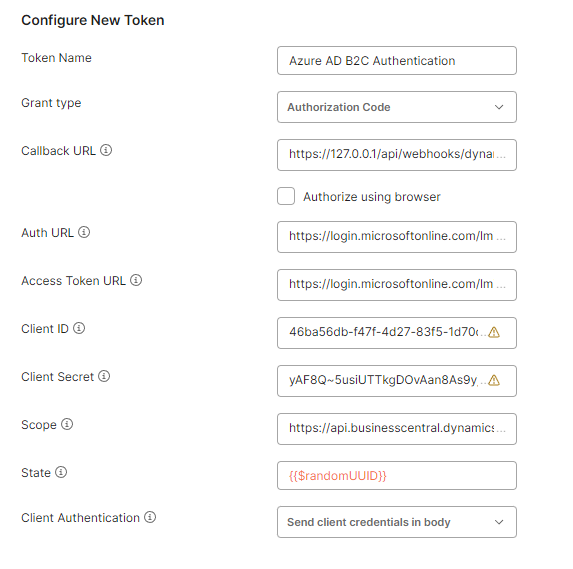
Grant type: Authorization Code.
Callback URL: added to Connect App above (step 2).
Auth URL: https://login.microsoftonline.com/lmints.io/oauth2/v2.0/authorize
Access Token URL: https://login.microsoftonline.com/lmints.io/oauth2/v2.0/token
Client ID: Application (client) ID in Overview of Connect App.
Client Secret: value saved in step 3.
Scope: https://api.businesscentral.dynamics.com/.default
Note: {{tenantId}} = lmints.io
Trigger
- Business Central Schedule Pull Items (include option Pull ItemVariants).
- Business Central Receive Created Item (include option Pull ItemVariants).
- Business Central Receive Created Sales Shipment (include option Pull SalesShipmentLines).
- Business Central Receive Created Sales Invoice (include option Pull SalesInvoiceLines).
Action
- Business Central Send Created Sales Order.
How to
Get company
Get https://api.businesscentral.dynamics.com/v2.0/{tenantId}/production/api/v2.0/companies
Authorization: Bearer {{Access token}}
=> Save the company Id to call api later.
Get https://api.businesscentral.dynamics.com/v2.0/{tenantId}/production/api/v2.0/companies({companyId})/items
Authorization: Bearer {{Access token}}
Push sales order
https://learn.microsoft.com/en-us/dynamics365/business-central/dev-itpro/api-reference/v2.0/resources/dynamics_salesorder
Post: https://api.businesscentral.dynamics.com/v2.0/{tenantId}/production/api/v2.0/companies({companyId})/salesOrders
Authorization: Bearer {{Access token}}
Content-type: application/json
{
"orderDate": "2023-09-01",
"customerNumber": "GL00000008",
"currencyCode": "GBP",
"paymentTermsId": "3bb5b4b6-ea4c-43ca-ba1c-3b69e29a6668"
}
Webhook
We currently can register webhook for: items, salesInvoices, salesShipments.
Ex: register webhook for items.
Post: https://api.businesscentral.dynamics.com/v2.0/{tenantId}/production/api/v2.0/subscriptions
Authorization: Bearer {{Access token}}
Content-type: application/json
{
"notificationUrl": "https://webhook.site/89773ff0-10a3-45e5-892b-4b5369e21c7f",
"resource": "/api/v2.0/companies(d0d0d64f-5be6-ee11-a201-6045bdc89dad)/items",
"clientState": "testClientValue"
}
NOTE
- Renew the subscription: Subscriptions will expire after three days, you need to renew it: PATCH https://api.businesscentral.dynamics.com/v2.0/lmints.io/production/api/v2.0/subscriptions(%7Bid%7D)
- Handshake Each time you call POST or PATCH subscription, you need to perform handshake: Once the POST is issued against the subscription API to create the subscription, Business Central will issue a request to the notificationUrl, passing a validationToken parameter on the query string. Subscriber needs to perform the handshake by returning validationToken in the response body and provide status code 200.
Was this article helpful?
That’s Great!
Thank you for your feedback
Sorry! We couldn't be helpful
Thank you for your feedback
Feedback sent
We appreciate your effort and will try to fix the article