What is an EDI Configuration?
Definition
An EDI Configuration is a set of default EDI settings defined for a trading partner that controls how EDI documents are formatted and interpreted.
These settings include EDI qualifiers and delimiters — the characters used to separate data elements, segments, and components within an EDI file — as well as structure definitions, schema, and code lists.
EDI Configuration can only be set up by the Host account. Customer accounts can view the configuration but cannot modify it. |
EDI Document Type
An EDI Document Type defines the structure and rules for a specific EDI transaction set (e.g., 850 Purchase Order, 810 Invoice).
Customer accounts can clone EDI Document Types that have been created by the Host, allowing them to use the same structure without having to build it from scratch.
Navigate to: Advance Config → Document Types to see the list of available Document Types, including EDI types.
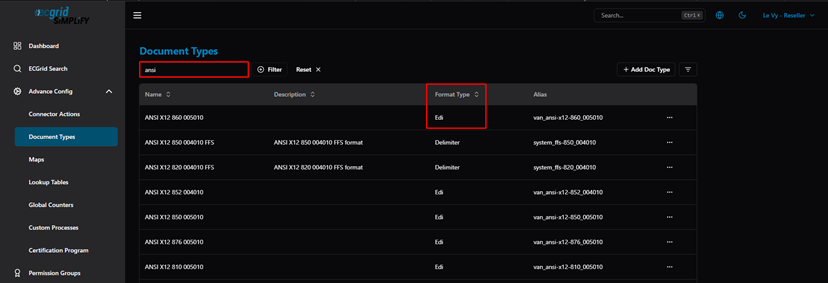
Figure: Document Types list — EDI Document Types visible to Customer account
To clone an EDI Document Type from the Host, open the actions menu on the desired Document Type and select Clone.
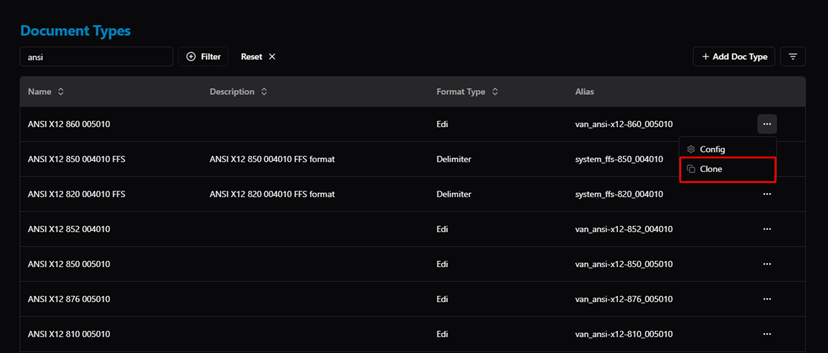
Figure: Clone EDI Document Type from Host
EDI Configuration Settings
The EDI Configuration defines the technical formatting rules for EDI files. These settings are configured at the Host level and include:
- Structure — the overall layout and segment order of the EDI document.
- Schema — the data type and length rules for each element.
- Code List — the valid code values allowed for specific fields.
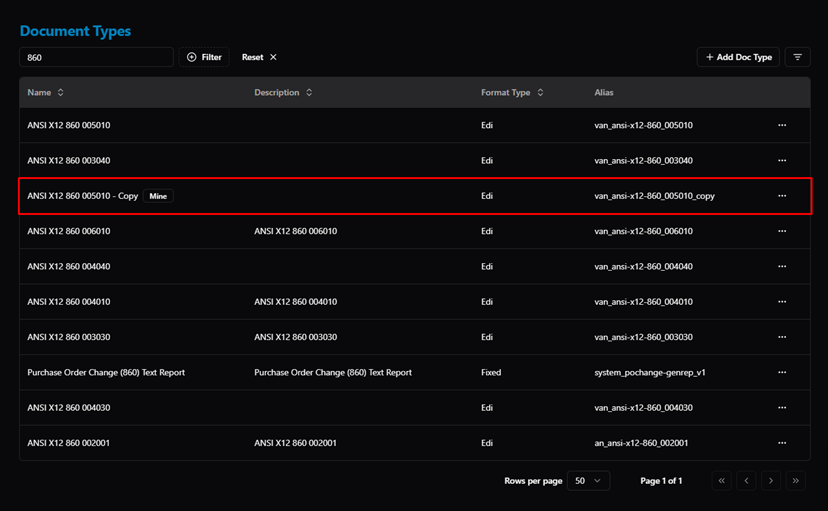
Figure: EDI Configuration — set up by Host (structure, schema, code list)
Was this article helpful?
That’s Great!
Thank you for your feedback
Sorry! We couldn't be helpful
Thank you for your feedback
Feedback sent
We appreciate your effort and will try to fix the article