What is an Acknowledgment?
Definition
An Acknowledgment is an automatic confirmation sent back to a trading partner after their file has been received and processed.
When Simplify receives an EDI or Delimiter file, it can automatically send an acknowledgment back to the sender to confirm that the file was successfully received — without requiring any manual action.
Acknowledgments are only supported for EDI and Delimiter document types, and only on the following connection types: ECGrid VAN, FTP, and SFTP. |
How It Works
- When a file arrives via a supported connection (ECGrid VAN, FTP, or SFTP), Simplify processes the file through the configured Flow.
- If an Acknowledgment is configured on the step, Simplify automatically sends a 997 Functional Acknowledgment back to the sender.
- Each trading partner can be configured independently — you can also check "Skip Send Ack" for partners that do not require acknowledgment.
Where to Find It
Navigate to: Flows → open a Flow → open a step (Trigger or Action) → Setup Acknowledgments tab.
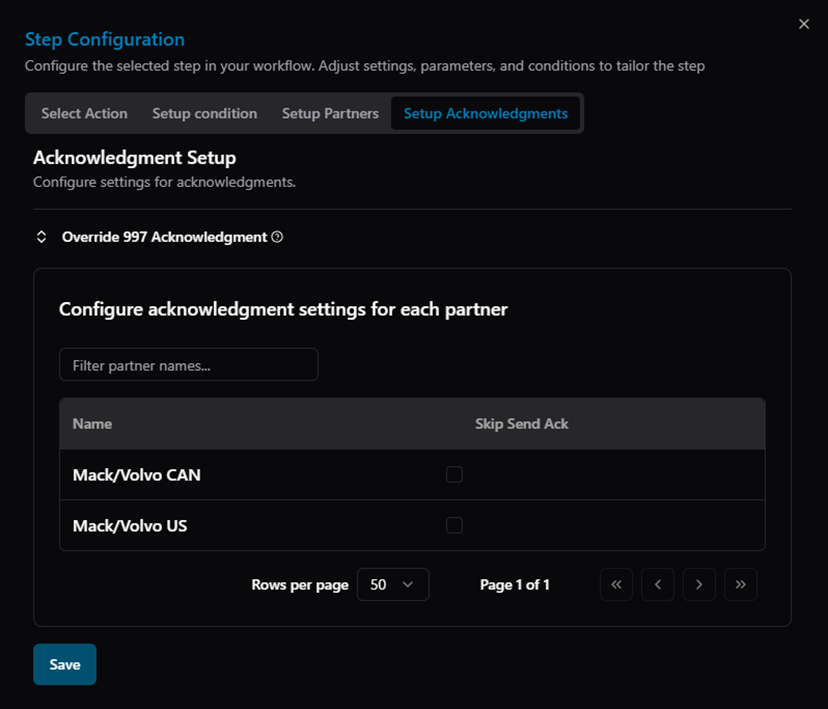
Figure: Step Configuration — Setup Acknowledgments tab showing per-partner acknowledgment settings
Related Articles
For more details, refer to the following articles in the Knowledge Center:
Was this article helpful?
That’s Great!
Thank you for your feedback
Sorry! We couldn't be helpful
Thank you for your feedback
Feedback sent
We appreciate your effort and will try to fix the article