By default, ECGrid Simplify sends a 997 Functional Acknowledgment in response to inbound documents. If you have a trading partner that doesn't want to receive a 997 for a specific document type, you can turn this off per partner.
- In Simplify, open the relevant inbound flow (e.g., the 850 inbound flow).
- Click on the first step — the one where the document is received from the ECGrid VAN.
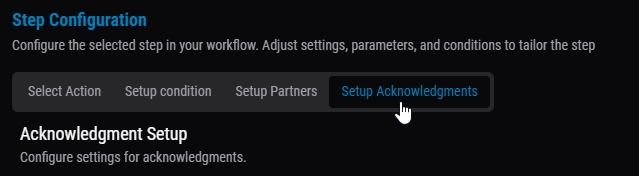
- Go to the Setup Acknowledgments tab:
- Under "Configure acknowledgment settings for each partner," find the trading partner you don't want to send a 997 to.
- Check the Skip Send Ack box next to that partner's name:
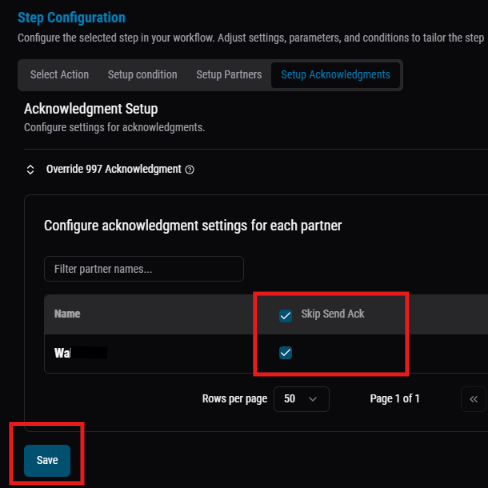
- Click Save.
Once saved, ECGrid will no longer send a 997 to that trading partner for this document type, while acknowledgments to your other partners on the same flow remain unaffected.
Was this article helpful?
That’s Great!
Thank you for your feedback
Sorry! We couldn't be helpful
Thank you for your feedback
Feedback sent
We appreciate your effort and will try to fix the article