What is a Document Detector?
Definition
A Document Detector is a configuration on a Document Type that tells Simplify how to recognize and classify an incoming file. When a file arrives in the system, the detector examines its contents and determines which document type it belongs to, so it can be routed and processed correctly.
How Detection Works
- XML — The detector uses an xpath pointing to a field that always appears in that document. When Simplify finds that field at the specified path, it knows the file belongs to that document type (e.g., /bill/purchaseorder_id).
- Fixed-Length, Delimited, and EDI — The detector uses a regular expression to identify the file format and match it to the correct document type.
Where to Find It
Navigate to: Advance Config → Document Types in the left navigation menu.
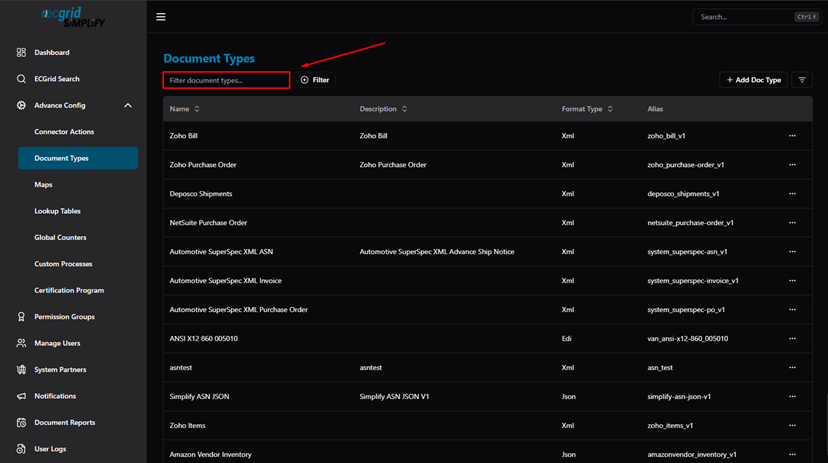
Document Types — list view (Name, Description, Format Type, Alias)
Click ··· on a Document Type and select Config to open its detail page:
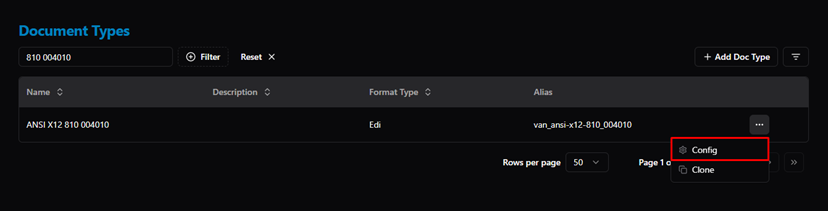
Document Type — actions menu (Config / Clone)
In the detail page, select the Detector tab to view or edit the document detectors:
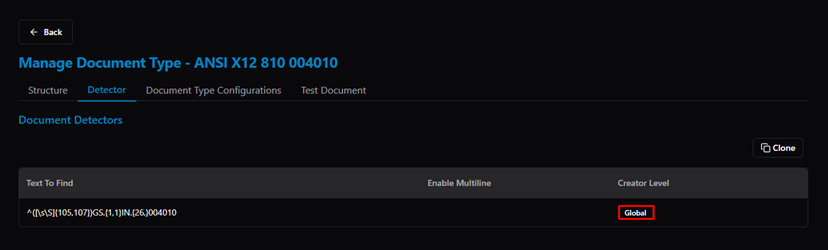
Manage Document Type — Detector tab showing regex pattern and Creator Level
Related Articles
For more details, refer to the following articles in the Knowledge Center:
Was this article helpful?
That’s Great!
Thank you for your feedback
Sorry! We couldn't be helpful
Thank you for your feedback
Feedback sent
We appreciate your effort and will try to fix the article