What is a Trigger?
Definition
A Trigger is the first step in a Flow and defines how the system receives or retrieves incoming files. There are two types of triggers:
Account Level
Triggers are configured inside Flows, which are managed at the Customer level. A Customer account login is required to access and configure Trigger steps. |
Types of Triggers
- Pull Action — Simplify actively pulls files from a connection (such as FTP, SFTP, or Azure Storage) based on a configured frequency. You define how often to pull, what document type to process, and which connection to use.
- Receive Action — Simplify passively receives files via webhook. Whenever a change or update occurs on the connection, the connection sends a webhook call to Simplify, which then processes the received files or updates related data such as lookup tables.
Single Branch vs Multiple Branches
A Trigger can route to one or more Action branches depending on how the flow is configured:
Single branch — one Trigger connects to one Action through Built-in Steps:
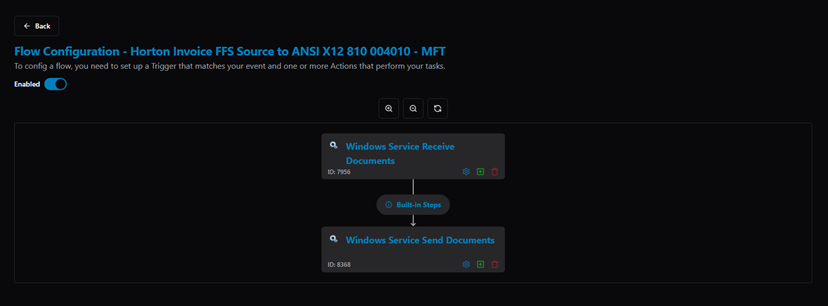
Flow Configuration — single branch: Trigger → Built-in Steps → Action
Multiple branches — one Trigger connects to multiple Action branches in parallel. Each branch can have its own Conditions to determine which branch executes for a given document:
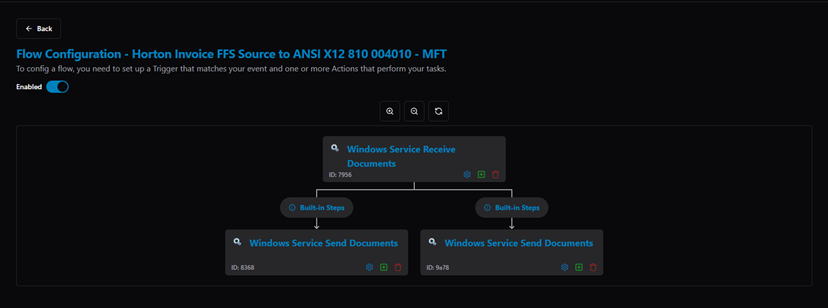
Flow Configuration — two branches: Trigger splits into two independent Built-in Steps → Action paths
Additional Configuration
A Trigger step can also be configured with:
- Conditions — to control whether the step executes based on document content.
- Partner Assignments — to match specific trading partners to this step.
- Acknowledgment Settings — to define how response documents (such as 997s) are generated and sent.
For step-by-step instructions on adding a Trigger, refer to the Flow documentation.
Related Articles
For more details, refer to the following articles in the Knowledge Center:
Was this article helpful?
That’s Great!
Thank you for your feedback
Sorry! We couldn't be helpful
Thank you for your feedback
Feedback sent
We appreciate your effort and will try to fix the article