Answer
Yes. Company Admins can manually export the products in any catalog directly from the catalog detail view. Exports are available in three formats: CSV, XML, and JSON.
Note
Catalog export is available to Company Admins only. Company Users do not have access to the export function. If you do not see the export option, contact your Company Admin.
Available Export Formats
Choose the format that best fits how the exported data will be used.
Format | Best For |
CSV | Spreadsheet review, data analysis, sharing with teams who use Excel or Google Sheets, or importing into other systems that accept flat-file data. |
XML | Integration with enterprise systems, EDI workflows, or any downstream application that expects structured XML input. |
JSON | Developer use, API-based integrations, or any system that consumes structured JSON data. |
How to Export a Catalog
- Navigate to Catalogs. Select Catalogs from the left navigation menu under publish and open the catalog you want to export.
- Locate the Download option. Within the catalog detail view, find the Download option under the three dots on the right. This option is visible to Company Admins only.
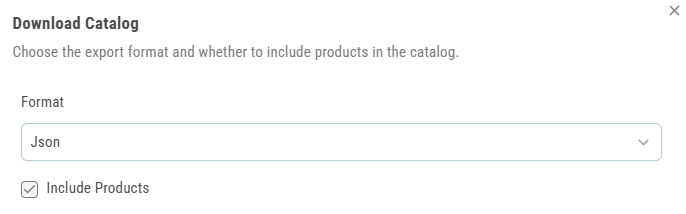
- Select a format. Choose your preferred export format: CSV, XML, or JSON.
- Download the file. The file is generated and downloaded to your device. The export includes all products currently in the catalog along with their associated fields and attributes.

Tip
The export reflects the current state of the catalog at the time of download. If products have been recently added or updated, make sure changes are saved before running the export to ensure the file is complete and current.
Was this article helpful?
That’s Great!
Thank you for your feedback
Sorry! We couldn't be helpful
Thank you for your feedback
Feedback sent
We appreciate your effort and will try to fix the article