Overview
An ADF file is the file definition format used by the spEDI map application from TIE Kinetix. Simplify can import an ADF file directly, using it to build a document type structure that can then be used as the source or target of a map.
Prerequisites
- Access to a reseller or developer account in Simplify
- The .adf file exported from the spEDI map application
- Knowledge of whether the source layout is fixed length or character delimited
Steps
Step 1: Create the document type
- In your reseller or developer account, create a new document type.
- Select the file type that matches the ADF file's layout: Fixed (fixed length) or Delimiter (character delimited).
- Complete the remaining required fields (Name, Alias) and save.
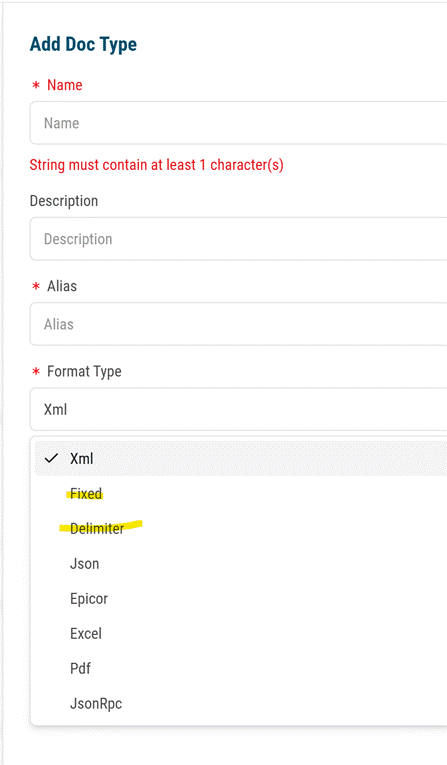
Add Doc Type dialog — select Fixed or Delimiter as the Format Type.
Step 2: Locate the new document type
Find the document type you just created in the document type list. Tip: filter the list by "Mine" to quickly narrow the results to document types you created.
Step 3: Import the ADF structure
- Click the three-dot menu to the right of the document type, then select Configure.
- Click Import.
- Under Structure Format, select ADF.
- Select the .adf file and complete the import.
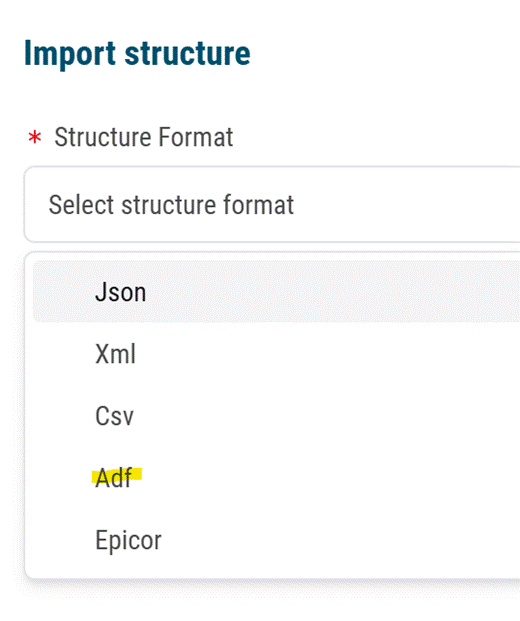
Import structure dialog — select Adf as the Structure Format.
Result
The document type structure is built from the ADF file definition and is ready to be used as the source or target of a Simplify map.
Was this article helpful?
That’s Great!
Thank you for your feedback
Sorry! We couldn't be helpful
Thank you for your feedback
Feedback sent
We appreciate your effort and will try to fix the article