
Solutions and Capabilities
After You're Set Up: How Peppol Data Reaches You
Once your access point is live, here's exactly how a document travels from a trading partner to your client — and what ECGrid handles for you along the way.
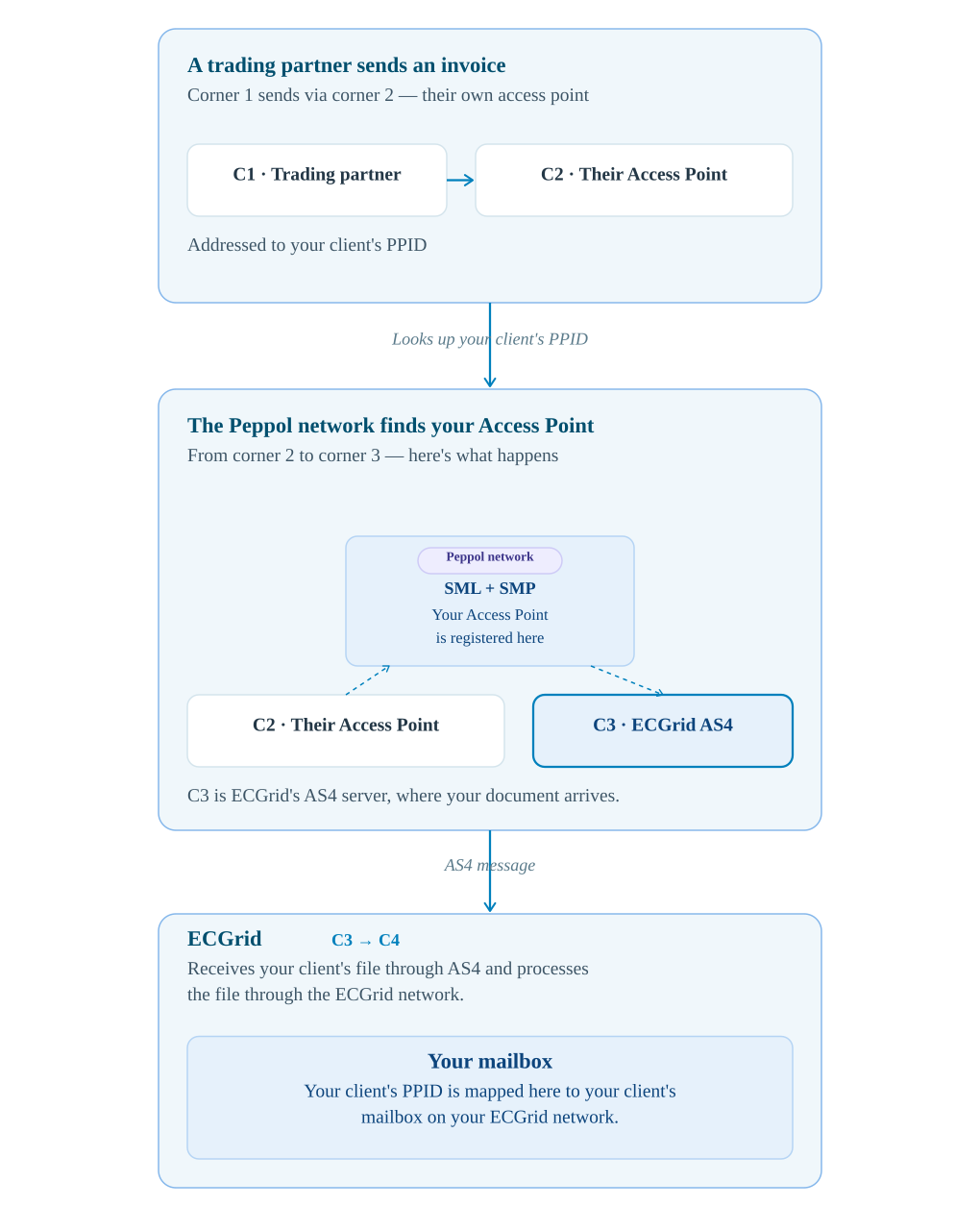
PPID/SML/SMP/Access Point — What do they mean and how do they work together?
These terms come up constantly in Peppol documentation, and they're easy to mix up. Here's what each one actually does, and how they connect.
Your client's address on the Peppol network. A PPID is built from an identifier they already have — a VAT number, a national enterprise number, a GLN, and so on — paired with the scheme that identifies which kind of number it is. It's what a trading partner uses to reach that specific client, and it's what appears as their electronic address on invoices.
Service Metadata Locator. A network-wide directory-of-directories. It doesn't hold any of your business details — it only answers one question: "which SMP is responsible for this PPID?" It works much like DNS does for websites, pointing a request to the right server rather than answering the request itself.
Service Metadata Publisher. The actual registry that holds your clients' details — which document types they accept and the AS4 address to deliver to. ECGrid operates the SMP for its customers, so this is where each client's PPID and its routing information actually live.
The connection point that actually sends and receives documents over AS4. Your Access Point is what's registered in ECGrid's SMP as the destination for your clients' PPIDs — and as covered earlier in this guide, ECGrid's own AS4 server is what carries out that connection on your behalf.
How does your client get a PPID?
There's no separate application to Peppol, and nothing to design from scratch. A PPID is just two pieces stitched together: a scheme (a four-digit code identifying what kind of number follows) and an identifier value your client already holds — most often a VAT number, a national enterprise or company registration number, or a GLN (Global Location Number). Written out, it looks like 0208:0123456789 — scheme, colon, value.
The identifier itself always comes from wherever your client normally gets that kind of number — never from Peppol or from ECGrid. A VAT number comes from their national tax authority, an enterprise number from their national business registry, and a GLN from GS1. If they already have one of these, they already have everything needed to be identified on Peppol; nothing new has to be issued.
The one thing that does take a bit of care is picking the correct scheme code for their country and identifier type — the same VAT number, for instance, is registered under a different scheme code in Belgium than it would be in Germany. That determination is completed by you and your client: check OpenPeppol's official Participant Identifier Schemes list for your client's country to confirm the right one. Send ECGrid Support the completed PPID, scheme and identifier together, and we'll register it to your Access Point in our SMP, which is also what lists it in the network's SML so trading partners anywhere can find it.
If a client operates in more than one country, or wants to be reachable under more than one identifier (for example, both a VAT number and a GLN), they can register multiple PPIDs the same way. Each one is independently discoverable and can even be mapped to a different mailbox if you want documents for different identifiers handled separately.
Adding a new client and trading partner
Once you're live, bringing on a new client or trading partner is a two-step process — one you handle yourself, and one that ECGrid completes on the network side.
Contact ECGrid Support at any step in the process.
Email: support@ecgrid.com | Web: support.ecgrid.com
ECGrid by Loren Data Corp · support@ecgrid.com · ecgrid.com
View in support portal →Was this article helpful?
That’s Great!
Thank you for your feedback
Sorry! We couldn't be helpful
Thank you for your feedback
Feedback sent
We appreciate your effort and will try to fix the article