Use this article when you choose Authorization Type: Self Authorization in Simplify. Self Authorization uses an app built only for your own Amazon account, which is not listed on the Amazon App Store.
If you want to use the public ECGrid TaaS app instead, see How to connect Simplify to Amazon Seller Central using Website Authorization (ECGrid TaaS public app).
Before you start
Have these values from your own app: Merchant Id, Client ID, Client Secret and Refresh Token. Your Region is na (North America), eu (Europe) or fe (Far East).
Steps
In Simplify, open My Connections on the left menu.
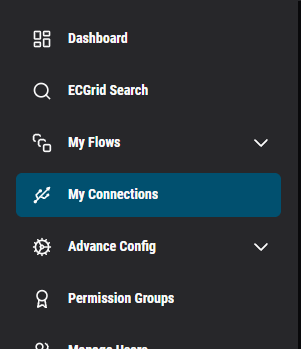
Click Add Connection.

In Select connector, choose Amazon Seller Central.
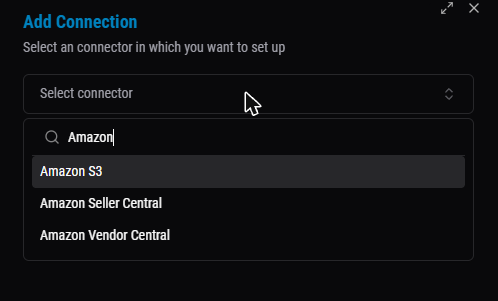
Enter a Connection Name and the Region.
Select Authorization Type: Self Authorization.
Fill in Merchant Id, Client ID, Client Secret and Refresh Token.
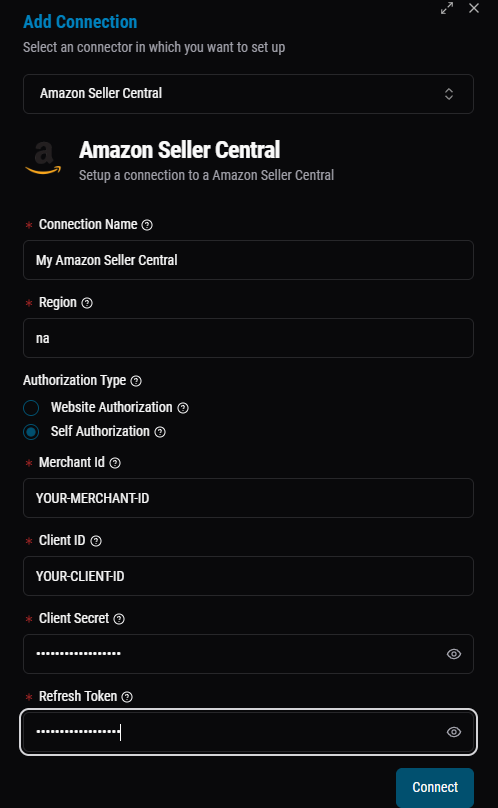
Click Connect.
Was this article helpful?
That’s Great!
Thank you for your feedback
Sorry! We couldn't be helpful
Thank you for your feedback
Feedback sent
We appreciate your effort and will try to fix the article
